



Panasonic PAN1783/1783A Evaluation Boards
Panasonic PAN1783 and PAN1783A Evaluation Boards are designed to facilitate the development and testing of BLUETOOTH® 5.4 Low Energy applications. These boards are based on the Nordic Semiconductor nRF5340 single-chip controller, featuring two Cortex®-M33 processors: one for application processing and the other for network processing. The boards support Bluetooth 5.4 LE, including LE 2M and LE Coded, providing high throughput and long-range capabilities. The boards offer multiple interfaces such as USB, UART, NFC, and numerous GPIOs, making them versatile for various applications.
Additionally, the Arduino form factor allows easy connection to shields available on the mass market. Security features include ARM TrustZone® CryptoCell™ 312, SPU, KMU, ACL for trusted execution, root-of-trust, secure key storage, and 128-bit AES encryption. With up to 48 GPIOs shared by multiple interfaces like SPI, I2C, UART, PWM, ADC, NFC-A, QSPI, and nRESET, these boards provide extensive connectivity options.
Features
- PAN1783 (module with antenna) and PAN1783A (module with bottom pad) Bluetooth 5.4 LE audio wireless module board variants
- 8MB external flash memory
- Arduino interface configurable as a shield or board
- mikroBUS™ interface
- All GPIOs are accessible via pin headers
- Power measurement interface
- Segger J-Link onboard debugger
- Virtual COM port over the Segger J-Link onboard debugger
- Peripherals can be deactivated for low-power applications
- 4x user buttons, 4x user LEDs
- Module native USB interface
- FPC connector for NFC antenna (antenna is included)
- Compatible with nRF Connect SDK projects
- Skyworks SKY66407-11 power amplifier (PAN1783A-PA EVB only)
Applications
- Vertical farming
- Commercial lighting
- Advanced computer peripherals
- Wearables
- BLE Audio-Auracast (hearing aids, stereo headphones, public address broadcast, home theaters, sports bar TVs)
- Smart homes
- Medical
- Location-based services
- Asset tracking
- Battery-powered devices
Block Diagram

Overview
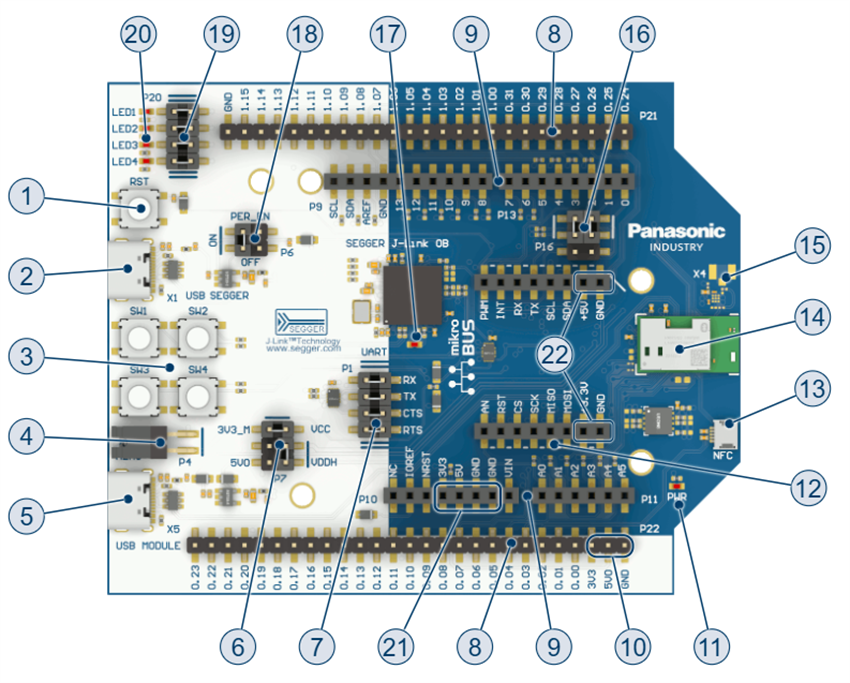
1. Reset Button - resets the board to a known-good state
2. USB connector - powers the board and allows access to the UART communication and debugging capabilities
3. User buttons - enables interaction with the running application if the application supports it
4. Current measurement pin header - measures the current consumption of the currently running application
5. Module native USB connector - allows interaction with the USB interface of the module, directly connected to the module's USB pins
6. Power configuration pin header - use the power configuration pin headers to choose between 3.3V and 5V voltage levels
7. UART module connection pin header - allows users to disconnect the connection between the virtual COM port of the Segger J-Link onboard debugger and the module, useful to isolate the module for current consumption measurement
8. Breakout pin headers - allows access to all the module GPIO pins directly
9. Arduino pin headers - enables attachment to Arduino shields or boards
10. Power pins on breakout pin header - powers the board
11. Power LED - verifies that the board is correctly powered
12. mikroBUS pin headers - enables attachment of a Click™ board
13. NFC antenna connector - used to connect an NFC antenna
14. PAN1783 or PAN1783A module
15. U.FL antenna connector - enables connection of an external antenna
16. Arduino UART direction pin header - use the Arduino UART direction pin headers to choose the configuration when running in shield or board mode
17. Segger J-Link LED - verifies that the Segger J-Link onboard debugger is correctly powered
18. Peripheral disable pin header - controls the connection of the Segger J-Link onboard debugger to the power supply, useful for disconnecting certain peripherals for power consumption measurements
19. User LEDs pin header - controls the connection of the LEDs to the module pins
20. User LEDs - use the user LEDs from the application to interact with the user
21. Power pins on Arduino pin header - use these power pins on the Arduino pin header to power the board
22. Power pins on MikroBus pin header - use these power pins on the MikroBus pin header to power the board
Related Products

Panasonic PAN1783/A BLUETOOTH® 5.4 LE Audio Wireless Modules
Advanced wireless solutions based on the Nordic nRF5340 single-chip controller.

Panasonic Electronic Components Wireless Connectivity Solutions
Wide range of technologies that provide the flexibility to choose and apply wireless protocols.

Nordic Semiconductor nRF5340 Multicore System-on-Chip (SoC)
Integrates 2 Arm Cortex-M33 processors, security features, peripherals, and a 2.4GHz transceiver.

Skyworks Solutions Inc. SKY66407-11 BLUETOOTH® Front-End Module
Highly integrated Module designed to enable 2.4GHz to 2.483GHz BLUETOOTH® IoT applications.